About Cloud Storage Challenge
A free cloud storage practice game. Use a simulated Drive: upload, organise, share with the right permissions and restore deleted files.
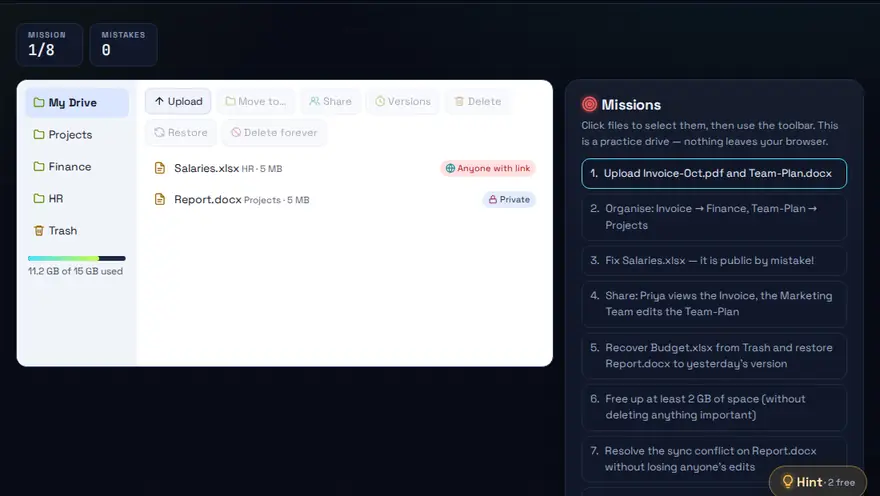
Skills you practise
- Upload & sync
- Sharing
- Permissions
- Restore
How to play
- Follow each task in the cloud drive.
- Choose sharing permissions carefully.
- Never expose sensitive files.
Why this skill matters
Teams now keep documents in online drives such as Google Drive, OneDrive or Dropbox. Using them well means knowing how to organise files, share with the right permission and recover a deleted item. The simulated drive in this game lets you practise those moves without risking real files. It is also practical cloud storage practice for students and new staff who need to learn how to share files in Google Drive or OneDrive, set the right permission and restore a deleted file from the trash.
Key terms you will meet
- Cloud storage
- Files saved on a provider's servers and reachable from any device with a login.
- Sync
- Keeping a local folder and the online copy matching automatically.
- Permissions
- What a person may do with a shared file: view, comment or edit.
- Sharing link
- A web address that grants access. 'Anyone with the link' is wider than 'specific people'.
- Version history
- A record of earlier copies of a file that lets you go back after a mistake.
- Trash / bin
- Deleted items kept for a limited time before being removed for good.
A worked example
A colleague needs to read your report but must not change it. You upload the file, put it in a 'Reports' folder, and share it with that person as Viewer rather than Editor. Later the file is deleted by accident, and you restore it from the Bin or from version history. The game scores you on choosing the narrowest permission that does the job.
Common mistakes to avoid
- Sharing with 'anyone with the link' when only one person needs access.
- Giving Editor rights when Viewer is enough.
- Assuming cloud storage is a backup. Deleting or overwriting syncs everywhere.
Questions people ask
Is cloud storage the same as a backup?
No. Sync copies changes, including mistakes, to every device. A backup keeps separate older copies you can restore.
What is the safest way to share a file?
Share with named people and the lowest permission they need, and remove access when the work ends.
How do I restore a deleted file in cloud storage?
Open the Trash or Bin in your drive, find the file and choose Restore. Most services keep deleted items for a limited time, commonly around 30 days, before removing them for good, so check early. The game lets you practise that recovery on a simulated drive.
Level: All · Best for: All students · Part of the Office & Productivity path. Pass it to earn the “Cloud Storage Challenge Master” badge and a game certificate.
Related: File Management Maze, Typing Race, MS Office Speed Challenge · Next: Algorithm Tower · All 18 games · About · IT glossary
Content reviewed by Hritik · 2026-11-11.