About Command Quest — Linux/CLI
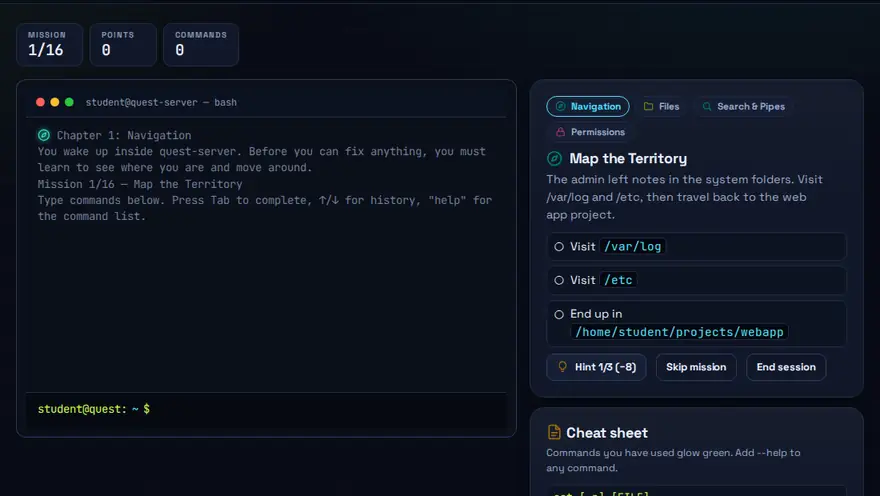
A free Linux command line practice game. A text adventure inside a real-feeling Linux shell. Use ls, cd, cat, grep, chmod and find to finish each mission.
Skills you practise
- Linux commands
- File-system navigation
- Permissions
- grep & find
How to play
- Read the mission objective.
- Type commands into the terminal and press Enter.
- Use hints if stuck — but fewer hints means more points.
Why this skill matters
Servers, cloud machines and many developer tools are driven from a text terminal, and Linux runs most of them. Someone who is comfortable with a few commands can check logs, move files and fix permissions in seconds, even over a remote connection with no graphical desktop. This game teaches the commands inside a story, so each one has a purpose. If you want to learn Linux commands as a beginner without installing anything, it works as a bash practice game in the browser: you type real commands into a simulated shell, so a mistake never touches a real system.
Key terms you will meet
- Shell / terminal
- The text interface where you type commands and read results.
- ls and cd
- ls lists what is in a folder. cd changes into another folder. Together they let you move around the file system.
- cat
- Prints the contents of a file to the screen.
- grep
- Searches text for a pattern, for example grep error log.txt shows only the lines containing 'error'.
- chmod
- Changes who may read, write or run a file. chmod 644 notes.txt gives the owner read and write, everyone else read only.
- Permissions
- Three sets of read, write and execute rights: for the owner, the group and everyone else.
A worked example
A mission says a secret key is hidden somewhere in the Documents folder. You type cd Documents, then ls to look around, then grep -r key . to search every file below the current folder for the word 'key'. A file shows up, you open it with cat, and the mission completes. The game explains each command in plain words after you use it.
Common mistakes to avoid
- Forgetting that Linux commands and file names are case sensitive.
- Running a command with sudo without knowing what it does.
- Setting chmod 777, which gives everyone full access and is almost never the right fix.
Questions people ask
Do I need to memorise every Linux command?
No. Learn the common handful, such as ls, cd, cat, grep and chmod, and use the man pages or help for the rest.
Why is Linux used on servers?
It is stable, flexible, free to use and well suited to remote administration.
How can I practise Linux commands without installing Linux?
Use a browser-based practice game or simulator. Command Quest gives you a safe, simulated shell where you can try ls, cd, cat, grep, chmod and find. When you feel ready, repeat the same commands on a real Linux machine, a virtual machine or Windows Subsystem for Linux.
Level: Intermediate · Best for: Intermediate · Part of the Programming & CLI path. Pass it to earn the “Command Quest Master” badge and a game certificate.
Related: Algorithm Tower, Debug Dungeon · Next: Phishing Detective · All 18 games · About · IT glossary
Content reviewed by Hritik · 2026-11-11.