About Network Setup Simulator
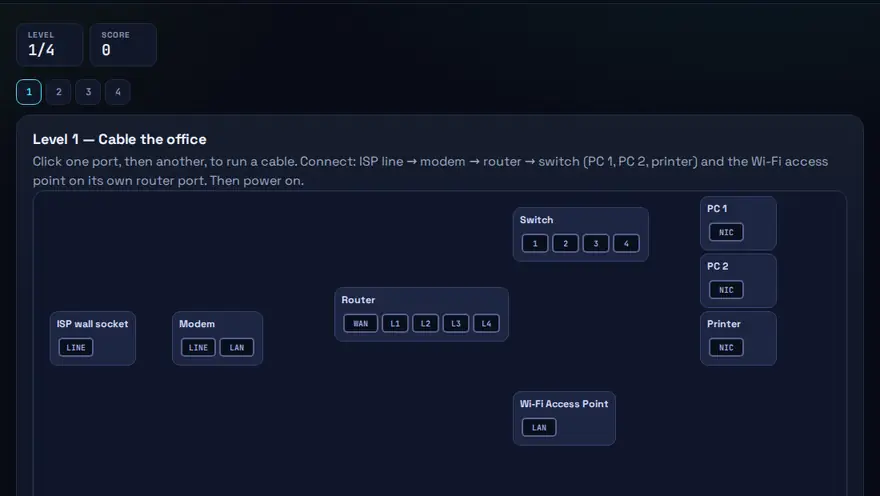
A free router and switch setup practice game. Wire up modem, router, switch, PCs and printer, then configure IPs and fix what breaks.
Skills you practise
- Cabling & topology
- IP addressing
- Wi-Fi setup
- LAN troubleshooting
How to play
- Connect devices by dragging cables between ports.
- Configure IP, mask and gateway on each device.
- Run ping tests and fix any failures.
Why this skill matters
Home, shop and office networks all follow the same pattern: a line from the internet provider, a modem, a router, sometimes a switch, and then devices. Technicians who can wire this correctly and set sensible IP addresses are the people who get the printer working again. The simulator lets you cable and configure a network, then fix what breaks. If you are learning home network setup as a beginner, it shows how to connect a modem, router and switch in the right order and why each device needs an IP address.
Key terms you will meet
- Modem
- Converts the signal from your internet provider into a form your network can use.
- Router
- Connects your local network to the internet and directs traffic between devices.
- Switch
- Connects several wired devices on the same local network.
- IP address
- A number that identifies a device on a network, for example 192.168.1.20.
- Subnet mask
- Tells devices which part of an IP address is the network and which part is the device, e.g. 255.255.255.0.
- Default gateway
- The router address a device sends traffic to when the destination is outside its own network.
A worked example
You connect the provider line to the modem, the modem to the router's WAN port, and a switch to a router LAN port. PCs and a printer connect to the switch. You give the printer a fixed address, 192.168.1.50, outside the router's automatic range, so it never changes. When two devices later clash on the same address, you spot the duplicate and correct it.
Common mistakes to avoid
- Plugging the modem into a LAN port instead of the router's WAN port.
- Giving two devices the same IP address.
- Using the wrong subnet mask or gateway, so a device cannot reach the internet.
Questions people ask
What is the difference between a router and a switch?
A router joins different networks, such as your home network and the internet. A switch links devices inside one network.
Why give a printer a fixed IP address?
So other computers can always find it. An automatic address can change after a restart.
In what order do I connect a modem, router and switch?
Follow the path of the internet connection: the line from your provider goes into the modem, the modem connects to the router, the router connects to a switch if you need more wired ports, and your PCs and printer plug into the router or switch. The router also hands out IP addresses to the devices.
Level: Intermediate · Best for: Intermediate · Part of the Networking path. Pass it to earn the “Network Setup Simulator Master” badge and a game certificate.
Related: Binary Builder, Packet Runner · Next: Binary Builder · All 18 games · About · IT glossary
Quick answers: What is a subnet mask? · What does a router do?
Content reviewed by Hritik · 2026-11-11.