About OS Installation Challenge
A free Windows and Linux installation simulator game. Boot from USB, partition the disk and install Windows or Linux — without wiping the wrong drive.
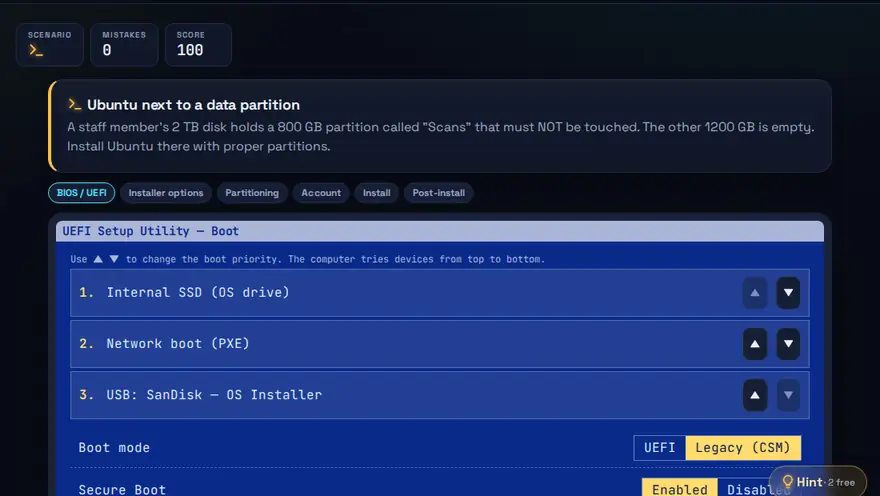
Skills you practise
- BIOS/UEFI boot
- Partitioning
- OS install
- Post-install setup
How to play
- Set the boot order in BIOS/UEFI.
- Partition the disk correctly for the chosen OS.
- Create your account and finish setup.
Why this skill matters
Installing or reinstalling an operating system is a core technician task, and it is also where the most damage can be done. Choosing the wrong disk can erase a customer's data. Knowing the boot, partition and install steps in the right order keeps work safe and fast. It works as BIOS and partitioning practice, and as install Linux practice, in a setting where a wrong click is harmless, before you try the real thing on a spare PC or a virtual machine.
Key terms you will meet
- BIOS / UEFI
- The firmware that starts the computer and lets you choose the boot device and settings.
- Bootable USB
- A USB drive prepared so the computer can start the installer from it.
- Partition
- A section of a disk treated as a separate drive, for example one for Windows and one for data.
- File system
- The way data is organised on a partition, such as NTFS for Windows or ext4 for Linux.
- Dual boot
- Having two operating systems installed side by side and choosing one at startup.
- Backup
- A separate copy of important files, made before any install or format.
A worked example
A customer's laptop will not start. You first confirm their files are backed up. You boot from a USB drive by changing the boot order in UEFI, choose a custom install, delete only the damaged Windows partition and leave the data partition alone, then install into the free space. The game warns you before you select a disk that holds data.
Common mistakes to avoid
- Formatting the wrong drive because you did not check disk sizes and names.
- Skipping the backup step.
- Forgetting to set the boot order, so the installer never starts.
Questions people ask
What is the difference between BIOS and UEFI?
UEFI is the modern replacement. It starts faster, supports larger disks and has better security features.
Will installing Linux delete Windows?
Only if you choose to replace it. A careful install into free space keeps Windows as a dual-boot option.
How can I practise installing Windows or Linux safely?
Learn the steps in a simulator first, then try them on a virtual machine such as VirtualBox or on a spare computer. Never practise on a PC that holds data you need, because choosing the wrong disk or partition can erase it.
Level: Intermediate · Best for: Intermediate · Part of the Hardware & Systems path. Pass it to earn the “OS Installation Challenge Master” badge and a game certificate.
Related: Hardware Builder, Troubleshoot It! · Next: Command Quest — Linux/CLI · All 18 games · About · IT glossary
Quick answers: How do you build a PC step by step?
Content reviewed by Hritik · 2026-11-11.